Adobe stopped distributing and supporting Flash® Player after Dec 31, 2020 (please refer to Adobe Flash® Player EOL General Information Page). As a consequence, Adobe and most web browsers will stop supporting Flash® Player after the EOL Date. This situation will affect some of our instruments which use Adobe Flash® Player browser plug-in software in order to generate reports from a computer. Please note that it will still possible to perform experiments as normal and view the data in the graph page, but not export it as a report. The instruments affected by this change are AMPTS® II, AMPTS® II Light and Gas Endeavour® purchased before January 2019.
(Recommended)
Upgrade the instrument with the latest embedded server (the instrument’s computer, please see photo below for reference). All those instruments equipped with the first generation of sensor boards (Tung element) have to upgrade these to the second generation (Hall element) sensors boards in order to support the new embedded server. This cannot be done by the user and requires that the instrument is sent to the factory for complete hardware upgrade.
Upgrade the instrument with a software version that doesn’t require Adobe Flash® Player browser plug-in software to generate reports. This option is only available for instrument’s currently equipped with the latest embedded server.
(Recommended)
Use an old version of a web browser that allows for a Flash® Player plugin software. This is not recommended since it will introduce a security risk for your computer. If this option has to be selected, it is recommended to run it on a dedicated computer that is not connected to your local network or internet.
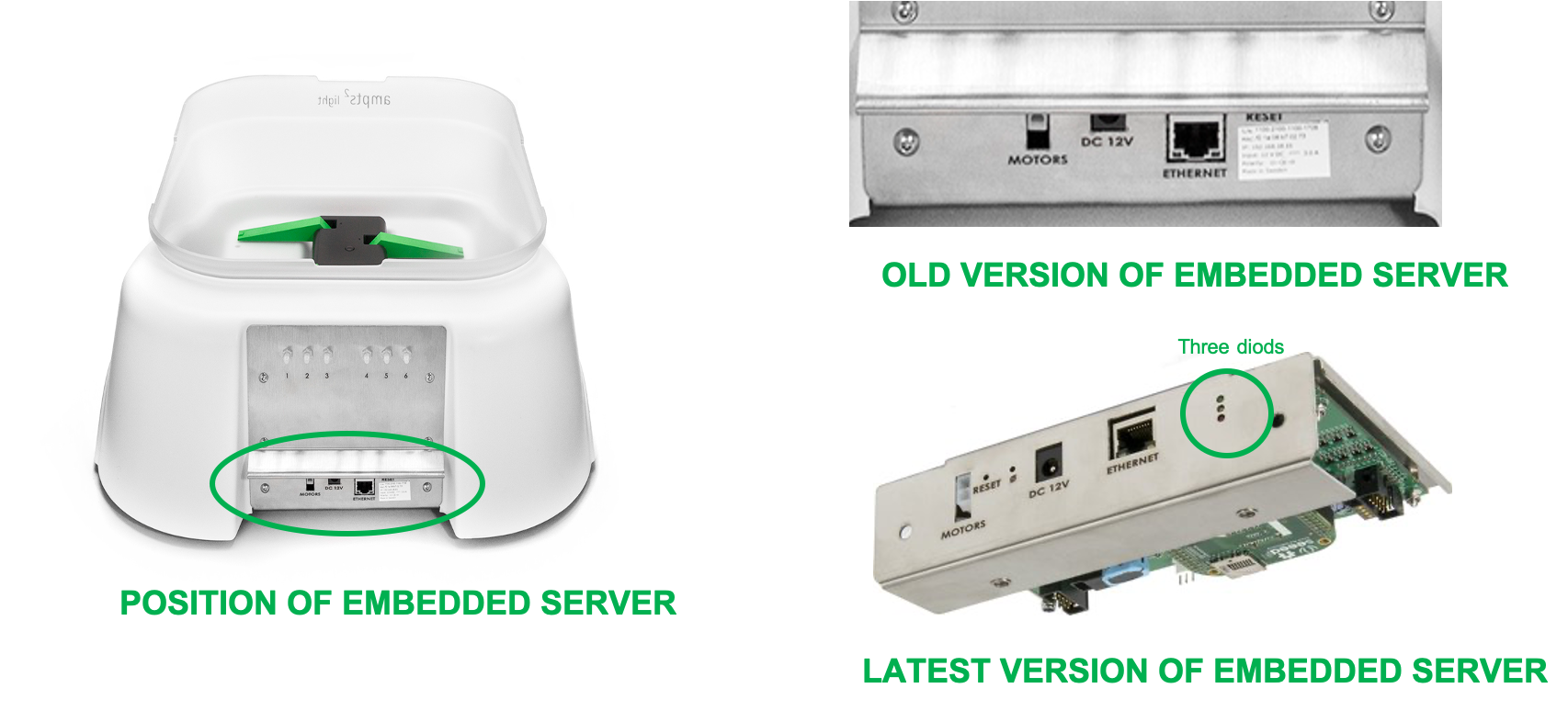
The software upgrade is free of charge while the hardware upgrades will be charged accordingly. Please contact support@bpcinstruments.com and we will assist you to select the right solution. To speed up the process, please include the following in your mail:
- Type of instrument (AMPTS® II, AMPTS® II Light or Gas Endeavour®)
- Serial number (16 digit number found on sticker at backside of the instrument)
- Photo of your embedded server (like in graphics above)
- Photo of a flow cell where the tip is clearly visible